
Why Complementary Shaders - Unbound is a top-tier shader mod for Minecraft 1.21.11
Transforming the visuals of Minecraft with exceptional quality, detail, and performance.
⚙️ Quick Resource Specs
| Mod Creator | EminGT |
| Latest Version | 1.21.11 |
| Supported Game Versions | 1.21.11, 1.21.10, 1.21.9, 1.21.8, 1.21.7 |
| File Size | 3.30 MB |
| Last Updated | |
| Total Downloads | 127,087,715 downloads |


About
Complementary Shaders is a shader pack for Minecraft Java Edition with exceptional attention to detail, high standards of quality, and top tier optimisation. It offers a ton of high quality effects, two default visual style choices, custom effects for almost every block in the game, profiles ranging from Potato to Ultra and it's designed to never be obstructive during gameplay. It started as an edit of BSL Shaders in 2018, and it received countless major updates including a complete rewrite to meet the standards of our community. Complementary Shaders is dedicated to be shaped by user feedback over anything else, and it still receives regular updates to this day.
Choose Your Style
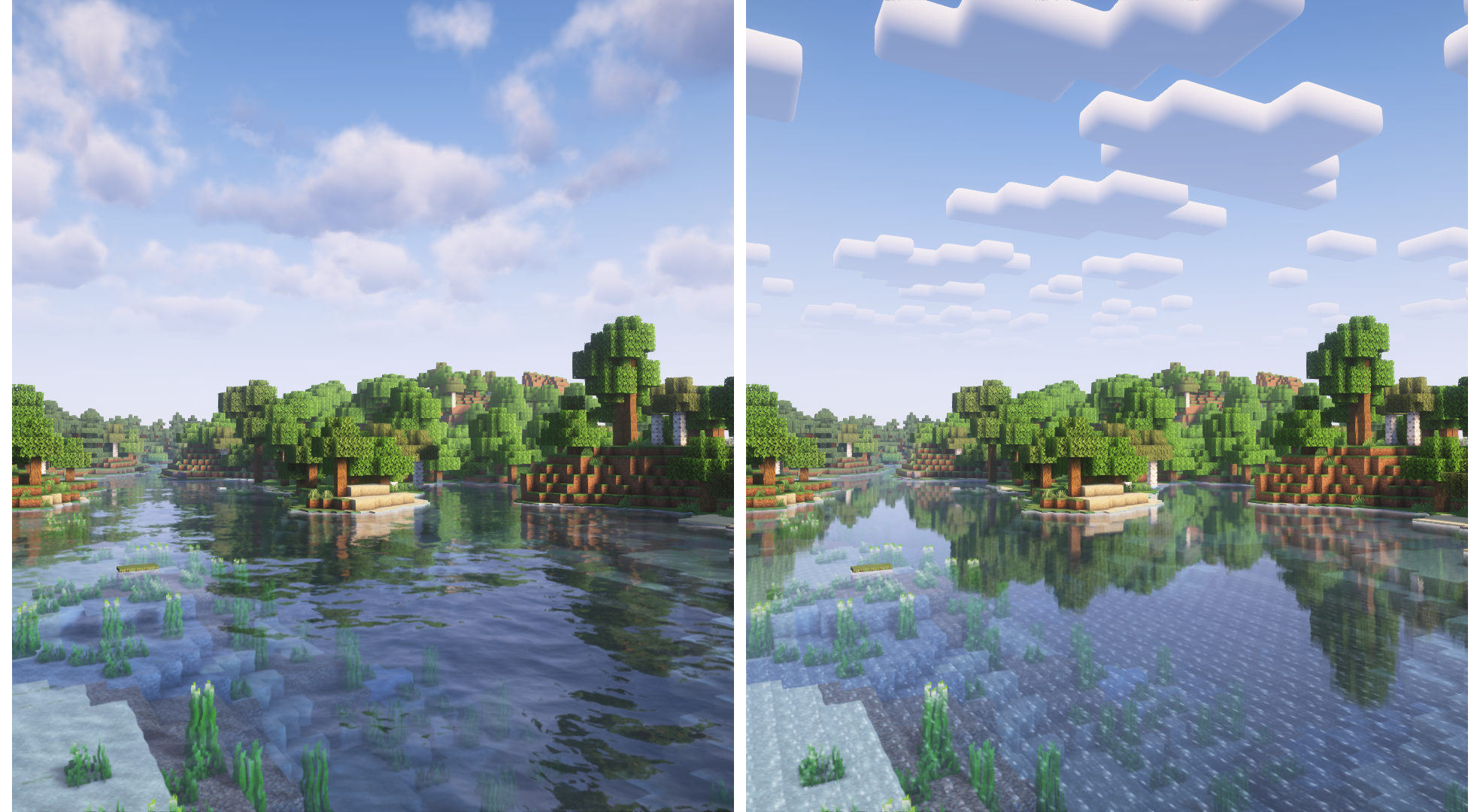
Complementary Shaders comes with two distinct visual style options. The only difference between these two styles is the default settings. The Unbound style is designed for people looking for a more realistic experience, while the Reimagined style is made to reimagine Minecraft while preserving its unique visual elements. Please note that you can still customize everything after you download either style. You can switch to blocky clouds on the Unbound style, or use realistic water on the Reimagined style. All settings are located in Shader Options.
Unbound Style Reimagined Style
Installation
New: You can just download the Complementary Installer and click Install. It will automatically do all the steps below.
- First you need to install the "Iris" mod to be able to load shaderpacks.
- Then you need to launch the game, and get to the Shaderpacks/Shaders menu in Video Settings.
- Open the shaderpacks folder by clicking the button in the menu.
- Download Complementary Shaders and put it in the shaderpacks folder. (Please don't unzip the file)
- Get back in the game, and choose Complementary in the shaderpacks menu. (Refresh the menu if it doesn't appear)
Links
- Check out the ---> ---> Complementary Development Website <--- <--- for more information.
- Join the Complementary Discord community if you have any questions, or just want to talk.
- If you would like to support the development of Complementary, you can do so on Patreon.
The Ultimate Guide to Complementary Shaders - Unbound
If you are exploring the vast world of Minecraft modifications, Complementary Shaders - Unbound by EminGT is a standout shader that deserves your attention. With over 127,087,715 downloads, it has become a staple for players looking to enhance their experience. As the creator describes it, this project is "Transforming the visuals of Minecraft with exceptional quality, detail, and performance. ". Whether you are a veteran builder constructing massive cities, or simply a casual player looking to upgrade your survival world, this guide will provide you with all the essential details on how Complementary Shaders - Unbound alters the game.
What Makes It Special?
Unlike standard shaders that simply alter superficial elements, Complementary Shaders - Unbound digs deep into the game's engine to provide a cohesive, performance-focused experience. EminGT has clearly spent significant time refining the project to ensure that every aspect feels polished and responsive for version 1.21.11.
Installation Guide
Getting Complementary Shaders - Unbound up and running is straightforward. Follow these step-by-step instructions:
- Verify Your Version: Ensure your Minecraft launcher is set to version 1.21.11.
- Install Mod Loader (if required): If this is a mod, download the compatible loader (Forge, Fabric, NeoForge).
- Download the File: Click the secure download button above to retrieve the official file from CurseForge.
- Move the File: Place the downloaded file into your `mods`, `shaderpacks`, or `resourcepacks` folder depending on the shader type.
- Launch and Enjoy: Open Minecraft, navigate to the respective settings menu, and activate Complementary Shaders - Unbound.
Compatibility & Performance
Compatibility is robust. Complementary Shaders - Unbound is designed specifically for version 1.21.11, taking full advantage of the latest engine optimizations. Since this is heavily focused on optimization, you can expect significant frame rate improvements on both low-end and high-end hardware.


