

Why Particle Core is a top-tier mod mod for Minecraft 1.20.4
Particle optimizations: Culling, rendering optimizations, configurable particle-type-specific spawn reduction, and potion particle disabling. Compatible with Sodium, improves performance over Sodium alone.
⚙️ Quick Resource Specs
| Mod Creator | fzzyhmstrs |
| Latest Version | 1.20.4 |
| Supported Game Versions | 1.20.4, 1.20.3, 1.20.2, 1.20.1, 1.20 |
| File Size | 271.82 KB |
| Last Updated | |
| Total Downloads | 29,345,138 downloads |

Particle Core focuses on one thing: Optimizing particles. Vanilla Minecraft is quite inefficient with particles in a variety of ways. Particle Core aims to improve this.



What Does It Do?
Culling
The biggest performance improvement overall, Particle Core doesn't render particles you can't see. Makes sense! Only about a 12th of the lightbox is visible at standard FOVs, why render the 11/12 of particles you can't even see?
Rendering Optimizations
Particles that are rendered are optimized. Vertex transformations and lightmap polling are optimized. Vertex optimizations defer to Sodium.
By-Type Reduction or Disabling
Three methods are provided to either completely disable or reduce spawning of specific particle types. Any particle you can add via the /particle command is eligible.
- A particle_type tag. Add particle types to
particle_core:excluded_particlesto completely disable those particle types. Server Owners: this will disable those particles for every client that joins the server, use with caution! - Config-based by-type reduction map. In the particle core config (see below), a user can add mappings of
particle type identifiertochance double. - Turn of Potion Particles entirely. If you find potion particles on your screen annoying, head over to the config and turn them off!
Unlike invis-particle resource packs, this actually prevents the particles from spawning at all, improving performance.
Tweaking Vanilla settings
Two config options are provided that can fine-tune the standard vanilla options of ALL, DECREASED, and MINIMAL. One is effectively a dial between ALL and DECREASED, the second a dial between DECREASED and MINIMAL. If you simply want to tweak particle spawning a bit, for example if your computer runs fine with DECREASED but you personally don't like how many particles are still on screen, you can dial DECREASED back without going all the way to MINIMAL.
Config
Particle Core provides a config covering every feature added. locate the config in the standard .mincraft config folder. Config name is particle_core_config_v[x].json, where [x] is the current version number.
The config has a comprehensive "comment" section at the top of the file. Please read it for guidance on config usage.
turnOffPotionParticles
To some, potion particles are extremely annoying. Use this setting to turn them off.
reduceParticlesAllChance
A dial to tweak particle spawning between the ALL and DECREASED Minecraft setting.
reduceParticlesDecreasedChance
A dial to tweak particle spawning between the DECREASED and MINIMAL Minecraft setting.
disableParticles
Completely disable all client-side particle spawning.
reduceParticlesByType
Map to reduce specific particle spawning.
- key: identifier of the particle type, ex.
minecraft:smoke. - value: double between 0.0 and 1.0. 0.0 will completely disable the particle, 1.0 is normal spawning. Anything in between will be that fractional chance a particle succeeds at spawning.
disableOptimizations
If any feature in Particle Core is causing a conflict or it is simply undesired, every feature can be individually disabled by adding it's string key to this list. See comment for instructions.
Before
Without Particle Core, world rendering is at 41% of CPU time, with renderParticles the lions share of that at 25% of CPU time.

After
With Particle Core, rendering is now at only 16% of CPU time, particle rendering basically a non-item.

With Sodium
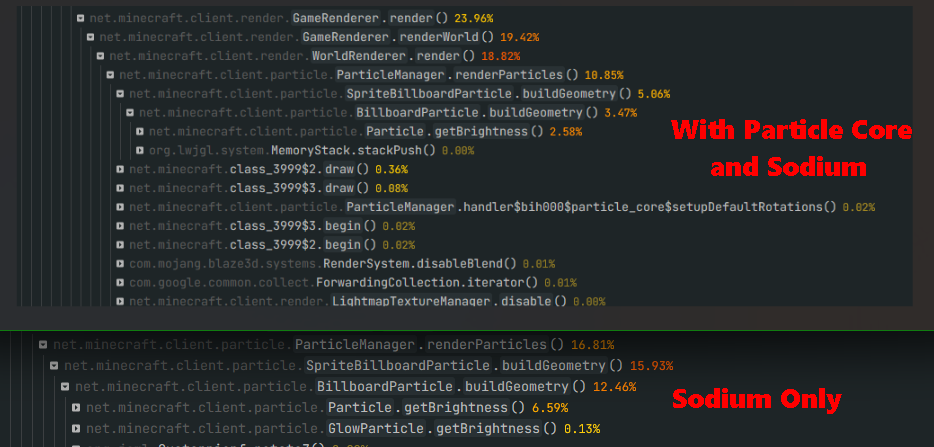
Improves performance over Sodium by itself. Top section of the screenshot with Particle Core, the bottom section is without it. About 5% CPU time improvement, or 50% relative improvement.

The Ultimate Guide to Particle Core
If you are exploring the vast world of Minecraft modifications, Particle Core by fzzyhmstrs is a standout mod that deserves your attention. With over 29,345,138 downloads, it has become a staple for players looking to enhance their experience. As the creator describes it, this project is "Particle optimizations: Culling, rendering optimizations, configurable particle-type-specific spawn reduction, and potion particle disabling. Compatible with Sodium, improves performance over Sodium alone.". Whether you are a veteran builder constructing massive cities, or simply a casual player looking to upgrade your survival world, this guide will provide you with all the essential details on how Particle Core alters the game.
What Makes It Special?
Unlike standard mods that simply alter superficial elements, Particle Core digs deep into the game's engine to provide a cohesive, performance-focused experience. fzzyhmstrs has clearly spent significant time refining the project to ensure that every aspect feels polished and responsive for version 1.20.4.
Installation Guide
Getting Particle Core up and running is straightforward. Follow these step-by-step instructions:
- Verify Your Version: Ensure your Minecraft launcher is set to version 1.20.4.
- Install Mod Loader (if required): If this is a mod, download the compatible loader (Forge, Fabric, NeoForge).
- Download the File: Click the secure download button above to retrieve the official file from CurseForge.
- Move the File: Place the downloaded file into your `mods`, `shaderpacks`, or `resourcepacks` folder depending on the mod type.
- Launch and Enjoy: Open Minecraft, navigate to the respective settings menu, and activate Particle Core.
Compatibility & Performance
Compatibility is robust. Particle Core is designed specifically for version 1.20.4, taking full advantage of the latest engine optimizations. Since this is heavily focused on optimization, you can expect significant frame rate improvements on both low-end and high-end hardware.


