

Why No Chat Reports is a top-tier mod mod for Minecraft 1.19.3
Makes chat unreportable (where possible)
⚙️ Quick Resource Specs
| Mod Creator | Aizistral |
| Latest Version | 1.19.3 |
| Supported Game Versions | 1.19.3 |
| File Size | 516.57 KB |
| Last Updated | |
| Total Downloads | 110,155,406 downloads |
This mod strips cryptographic signatures which, since 1.19, are attached to every message sent in the chat. Removing them makes it impossible to track and associate your chat messages with your Minecraft and, by extension, Microsoft account.
As of 1.19.1, it also disables Player Chat Reporting.
Please notice that, while I am aware of Guardian and certain other exploits that allow you to counteract reporting system on client against the will of the server, I am consciously choosing to not integrate them as part of this mod. No Chat Reports will remain effective on client side only if given server allows it to be. If you do not like servers that enforce chat signing and fully support chat reporting - I advise to simply not play on them.
Also, while there are many plugins out there that "borrow" the name and even icon of my mod, please be aware that I have not authored any of them and cannot say how well they do their job.
Installation and Use:
This mod supports both Forge and Fabric, just download the version for respective modloader. It can be installed on either client, server, or both sides, and will function differently depending on which sides it is present at:
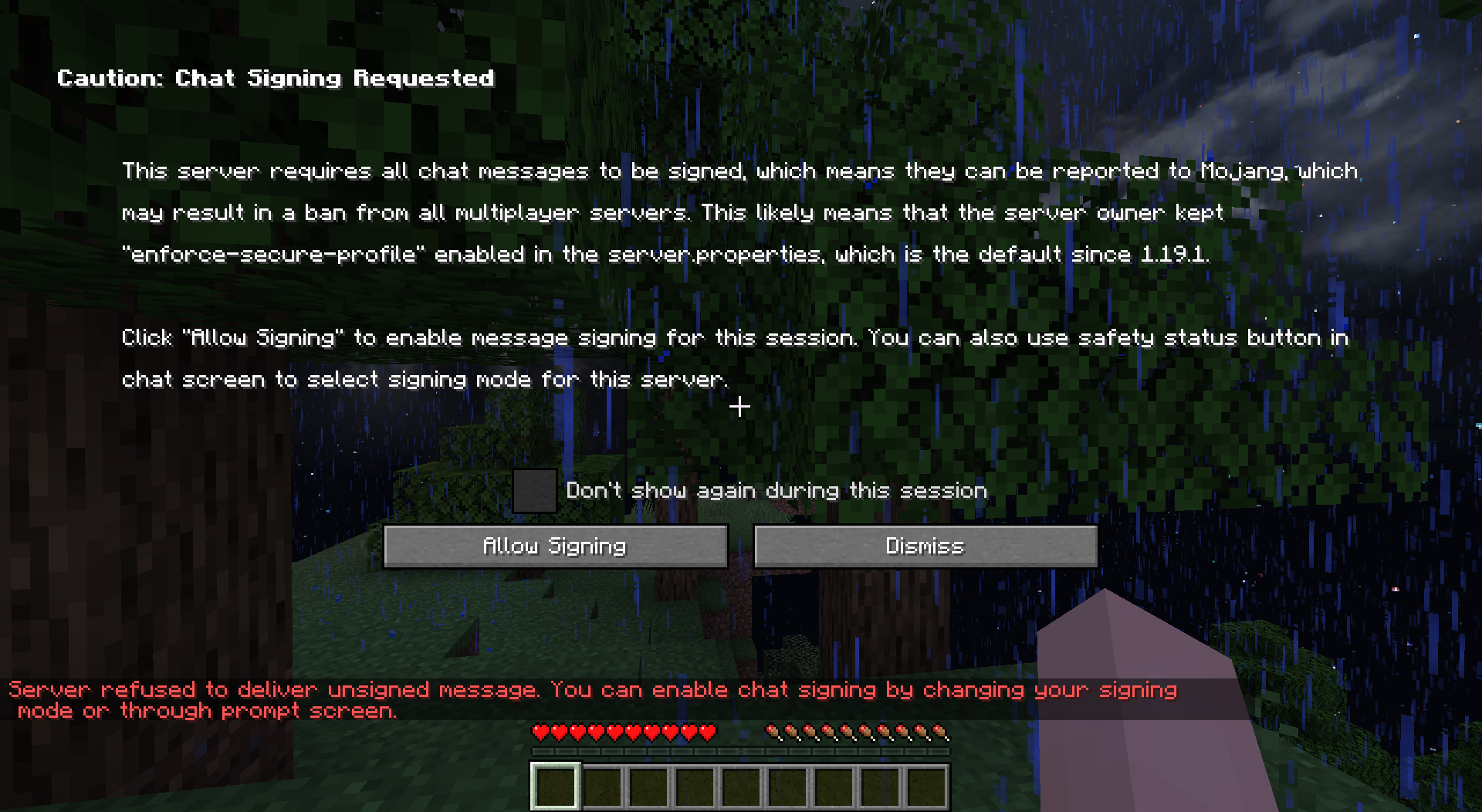
1. Only Client: Client will refuse to send account's public key to the server, and signatures will be stripped from the messages that you send. This way it won't be useful to try and report your messages, as there will be no proof they were actually sent from your account. Server will relay them unless "enforce-secure-profile" option is set to true in server options (which it is by default since 1.19.1), in which case you will not be able to join, unless you agree to send signed messages (the mod will supply warning screen);
2. Only Server: Clients will still attach signatures when sending messages to the server, but server will strip them before relaying them to other players. This way Chat Reporting will not work for any players that join. You can enable player to system message conversion in config, to prevent players without the mod from seeing them as "Not Secure";
3. Both Client and Server: Signature will be stripped on client side before sending messages to server, server will make no attempt to verify message signatures. Chat Reporting and Only Show Secure Chat will not function, and players will be notified that those features are disabled by the mod when trying to use them.
Even though the mod can function when present on only one of the sides, it can be configured to demand itself to be installed on another side in order to play. This way you can install it on server and require all clients that join to have this mod in order to have full functionality, but can also leave it server-only if you prefer. Configuration files are located in NoChatReports subfolder of default config folder.
Additionally, if installed on client, this mod will disable telemetry (similarly to how No Telemetry does).
To make Velocity compatible with this mod, set force-key-authentication = false in velocity.toml. Thanks to MrMelon54 for pointing this out.
Chat Encryption:
I have put together a video about chat encryption, you can watch it to learn how to use it (and whether you should):
Documentation:
You can find documentation and other information relevant to this mod on the Wiki. It currently features following articles:
- Configuration Files
- Protecting Server Players
- How to Get Safe Server Status
- I Got Banned!
- To Encrypt or Not to Encrypt
- The Realms Question
For Developers:
If you develop your own mod, plugin or other server software that in some way prevents chat reports, you can make No Chat Reports on client recognize servers with your software as safe. I wrote a small article about this. For clarification or further inquiries - contact me via Discord, link below.
Reasoning:
See my videos for an explanation of how message signatures and chat reporting work in the game, their failures and the reasoning behind the creation of this mod:
Join my Discord:

...to ask questions or provide feedback.
Support me on Buy Me A Coffee: https://www.buymeacoffee.com/aizistral

The Ultimate Guide to No Chat Reports
If you are exploring the vast world of Minecraft modifications, No Chat Reports by Aizistral is a standout mod that deserves your attention. With over 110,155,406 downloads, it has become a staple for players looking to enhance their experience. As the creator describes it, this project is "Makes chat unreportable (where possible)". Whether you are a veteran builder constructing massive cities, or simply a casual player looking to upgrade your survival world, this guide will provide you with all the essential details on how No Chat Reports alters the game.
What Makes It Special?
Unlike standard mods that simply alter superficial elements, No Chat Reports introduces a wide array of visual and mechanical features designed to seamlessly blend into the vanilla aesthetic. Aizistral has clearly spent significant time refining the project to ensure that every aspect feels polished and responsive for version 1.19.3.
Installation Guide
Getting No Chat Reports up and running is straightforward. Follow these step-by-step instructions:
- Verify Your Version: Ensure your Minecraft launcher is set to version 1.19.3.
- Install Mod Loader (if required): If this is a mod, download the compatible loader (Forge, Fabric, NeoForge).
- Download the File: Click the secure download button above to retrieve the official file from CurseForge.
- Move the File: Place the downloaded file into your `mods`, `shaderpacks`, or `resourcepacks` folder depending on the mod type.
- Launch and Enjoy: Open Minecraft, navigate to the respective settings menu, and activate No Chat Reports.
Compatibility & Performance
Compatibility is robust. No Chat Reports is designed specifically for version 1.19.3, taking full advantage of the latest engine optimizations. During typical gameplay, this addition maintains a stable frame rate, though lower-end laptops might experience slight stuttering. We recommend pairing this with performance boosters like Sodium or Iris to guarantee a silky-smooth experience.


