
Why Connectivity is a top-tier mod mod for Minecraft 1.20.1
Fix Login timeouts, Packet sizes errors, Payloads errors, ghostblocks and more.
⚙️ Quick Resource Specs
| Mod Creator | someaddon |
| Latest Version | 1.20.1 |
| Supported Game Versions | 1.20.1, 1.16.5, 1.16.4, 1.16.3, 1.16.2 |
| File Size | 51.87 KB |
| Last Updated | |
| Total Downloads | 149,152,784 downloads |
 Lightweight mod which solves several connection problems like Login-Timeouts, DecoderException, Packet size limits, Ghostblock issues, Payload too large and more. It also offers commands to analyze network traffic and a bunch of debugging utilities, advanced error logging, packet logging etc.
Requires Cupboard dependency to be installed in newer versions
- Login timeout
- Play timeout
- Detailed Network statistics
- Fix packet size exceptions during login/play
- Log data of too large packet to show sources
- Log warnings about too large data beeing sent
- Malformed/Malicious traffic protection
The mod is not required on both sides, but offers useful functionality for both sides.
Randompatches (in)compatibility:
Set this in the randompatches.toml config file so random patches does not crash when started alongside connectivity:
mixin_blacklist = ["ServerPlayNetHandlerKeepAlive"]
Connectivity has some overlap with randompatches and happens to apply first, which makes random patches crash.
Timeoutout/XL packets mod is incompatible/not needed alongside this

If you enjoy this mod consider supporting the development, any support is greatly appreciated.
The development is an unpaid free-time activity, so any support helps being able to spend more time on it.
You can support me on Patreon or just spreading the word around.

Network stats and Commands:
Commands for network stats show the traffic rate aswell as which packet is causing it. kb is short for kilobyte
Statistics are refreshed once per minute and save a history of up to 5 minutes. All commands have an optional minute count you can give it to display(1-5, 5 is default when no argument is given)
Normally most traffic is caused by chunk packets, modded packets should rarely exceed those.
Client side command to show outgoing traffic: /connectivity packetsClient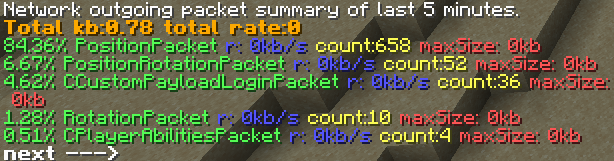
Server commands:
List traffic rate of all players: /connectivity packetsAllPlayers
List packets by type send to a specific player(example is player Dev): /connectivity packetsPlayer Dev

List all packets sent out by the server by packet type. /connectivity packetsSummary

Print the largest packet of a type to the latest.log, e.g. the packet called MovePacket: /connectivity printpacket MovePacket
The Ultimate Guide to Connectivity
If you are exploring the vast world of Minecraft modifications, Connectivity by someaddon is a standout mod that deserves your attention. With over 149,152,784 downloads, it has become a staple for players looking to enhance their experience. As the creator describes it, this project is "Fix Login timeouts, Packet sizes errors, Payloads errors, ghostblocks and more.". Whether you are a veteran builder constructing massive cities, or simply a casual player looking to upgrade your survival world, this guide will provide you with all the essential details on how Connectivity alters the game.
What Makes It Special?
Unlike standard mods that simply alter superficial elements, Connectivity introduces a wide array of visual and mechanical features designed to seamlessly blend into the vanilla aesthetic. someaddon has clearly spent significant time refining the project to ensure that every aspect feels polished and responsive for version 1.20.1.
Installation Guide
Getting Connectivity up and running is straightforward. Follow these step-by-step instructions:
- Verify Your Version: Ensure your Minecraft launcher is set to version 1.20.1.
- Install Mod Loader (if required): If this is a mod, download the compatible loader (Forge, Fabric, NeoForge).
- Download the File: Click the secure download button above to retrieve the official file from CurseForge.
- Move the File: Place the downloaded file into your `mods`, `shaderpacks`, or `resourcepacks` folder depending on the mod type.
- Launch and Enjoy: Open Minecraft, navigate to the respective settings menu, and activate Connectivity.
Compatibility & Performance
Compatibility is robust. Connectivity is designed specifically for version 1.20.1, taking full advantage of the latest engine optimizations. During typical gameplay, this addition maintains a stable frame rate, though lower-end laptops might experience slight stuttering. We recommend pairing this with performance boosters like Sodium or Iris to guarantee a silky-smooth experience.


