

Why Simple Voice Chat is a top-tier mod mod for Minecraft 1.21.10
A working voice chat in Minecraft!
⚙️ Quick Resource Specs
| Mod Creator | henkelmax |
| Latest Version | 1.21.10 |
| Supported Game Versions | 1.21.10, 1.21.1, 1.21 |
| File Size | 5.19 MB |
| Last Updated | |
| Total Downloads | 108,140,756 downloads |
Wiki | FAQ | Credits
A proximity voice chat for Minecraft with a variety of addons that offer additional features and functionalities.
⚠️ NOTE This mod requires special setup on the server in order to work. Please read the wiki for more information.

Please join the Discord if you have questions!
Downloads
Features
- Push to talk
- Voice activation
- Proximity voice chat
- Password protected groups
- Automatic voice activity detection
- Automatic microphone gain adjustment
- Opus codec
- RNNoise recurrent neural network noise suppression
- OpenAL audio
- Cross compatibility between Fabric, NeoForge, Forge, Quilt, Bukkit, Spigot and Paper
- Support for Velocity, BungeeCord and Waterfall
- Compatibility with ModMenu (Use ClothConfig for a better configuration UI)
- Configurable push to talk key
- Microphone and speaker test playback
- Configurable voice distance
- Whispering
- Individual player volume adjustment
- Microphone amplification
- 3D sound
- AES encryption
- Audio recording with separate audio tracks
- A powerful API
- Many addons
Want to host a server with Simple Voice Chat?

Icons
| Icon | Description |
|---|---|
 |
You are talking |
 |
You are whispering |
 |
Player is talking |
 |
Player is whispering |
 |
Microphone muted |
 |
Voice chat disabled |
 |
Voice chat not connected Voice chat not installed |
The GUI
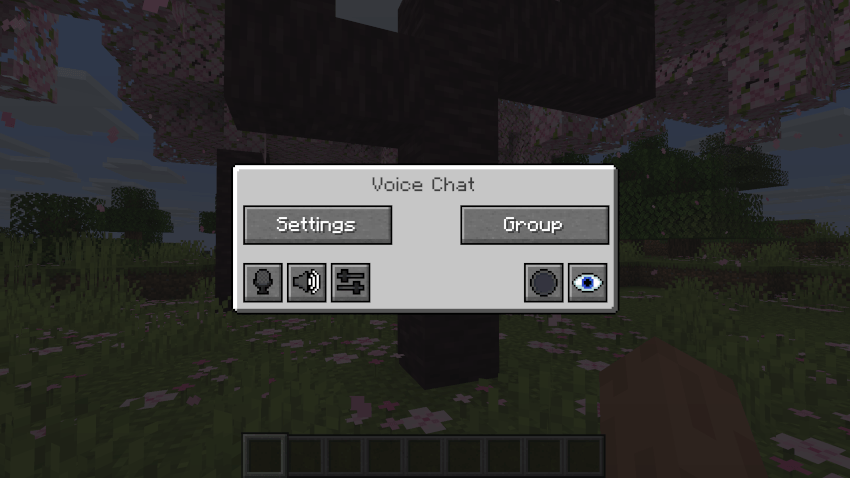
You can open the voice chat GUI by pressing the V key. This allows you to open the settings, group chats, mute yourself, disable the voice chat, start/stop a recording and hide all icons.
Group Chats
Group chats allow you to talk to players that are not in your vicinity. To open the group chat interface, either press the group button in the voice chat GUI or just press the group key.
To create a new group, just type a name in the text field and press the button at the bottom.
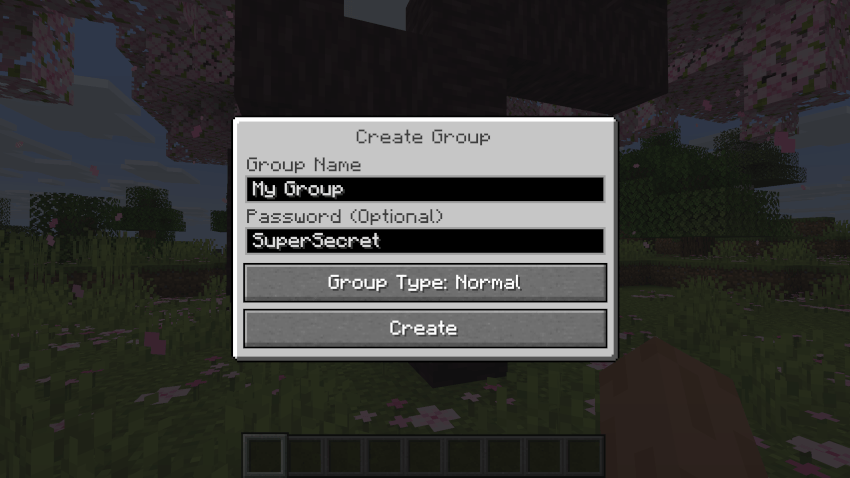
Creating or joining a group will bring you into the group chat interface. You will also see the heads of the group members in the top left corner of your screen. Talking players will be outlined. You can disable these icons by pressing the third button from the left.
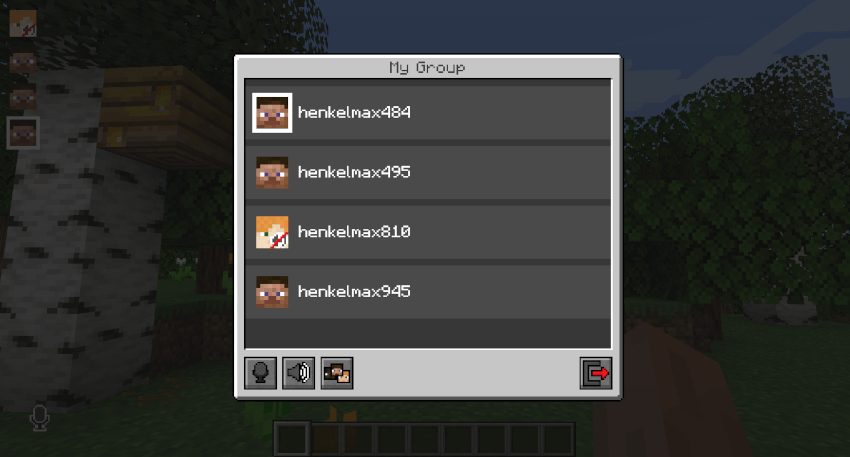
Players that are not in a group will see a group icon next to your head, indicating that you are in a group.
You can invite players to your group chat by entering the command /voicechat invite <playername> or from the social interactions screen.
Settings
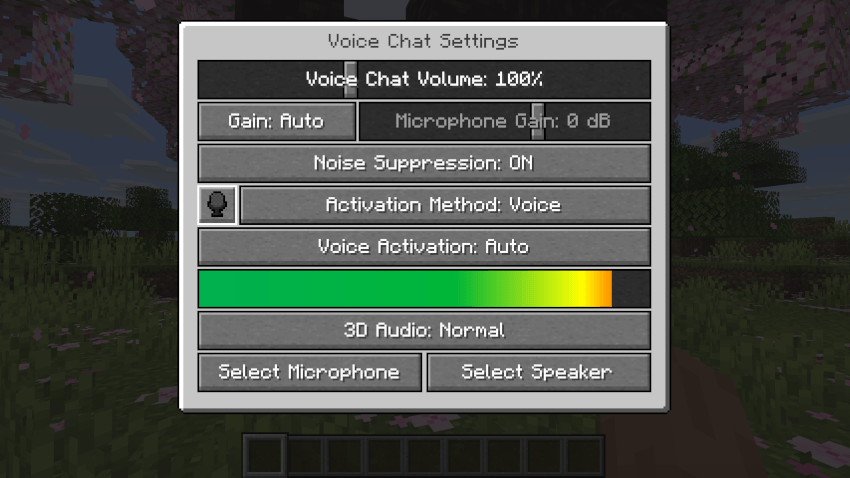
You can access the voice chat settings by pressing the V key and pressing the settings button.
This menu offers the ability to set up your voice chat audio settings.
By clicking the microphone button, you can test your microphone activation.
Important Notes
You need to open a port on the server. This is port 24454 UDP by default. Without opening this port, the voice chat will not work. This port can be changed in the server config. More information here.
The voice chat is encrypted, but we don't guarantee the security of it. Use at your own risk!
The Ultimate Guide to Simple Voice Chat
If you are exploring the vast world of Minecraft modifications, Simple Voice Chat by henkelmax is a standout mod that deserves your attention. With over 108,140,756 downloads, it has become a staple for players looking to enhance their experience. As the creator describes it, this project is "A working voice chat in Minecraft!". Whether you are a veteran builder constructing massive cities, or simply a casual player looking to upgrade your survival world, this guide will provide you with all the essential details on how Simple Voice Chat alters the game.
What Makes It Special?
Unlike standard mods that simply alter superficial elements, Simple Voice Chat introduces a wide array of visual and mechanical features designed to seamlessly blend into the vanilla aesthetic. henkelmax has clearly spent significant time refining the project to ensure that every aspect feels polished and responsive for version 1.21.10.
Installation Guide
Getting Simple Voice Chat up and running is straightforward. Follow these step-by-step instructions:
- Verify Your Version: Ensure your Minecraft launcher is set to version 1.21.10.
- Install Mod Loader (if required): If this is a mod, download the compatible loader (Forge, Fabric, NeoForge).
- Download the File: Click the secure download button above to retrieve the official file from CurseForge.
- Move the File: Place the downloaded file into your `mods`, `shaderpacks`, or `resourcepacks` folder depending on the mod type.
- Launch and Enjoy: Open Minecraft, navigate to the respective settings menu, and activate Simple Voice Chat.
Compatibility & Performance
Compatibility is robust. Simple Voice Chat is designed specifically for version 1.21.10, taking full advantage of the latest engine optimizations. During typical gameplay, this addition maintains a stable frame rate, though lower-end laptops might experience slight stuttering. We recommend pairing this with performance boosters like Sodium or Iris to guarantee a silky-smooth experience.


