
Why Author87668's LIGHT Shaders is a top-tier shader mod for Minecraft 1.21.11
As light as light, as beautiful as painting. Make you have both high FPS and good image quality.
⚙️ Quick Resource Specs
| Mod Creator | Author87668 |
| Latest Version | 1.21.11 |
| Supported Game Versions | 1.21.11, 1.21.10, 1.21.9, 1.21.8, 1.21.7 |
| File Size | 135.50 KB |
| Last Updated | |
| Total Downloads | 102,824 downloads |
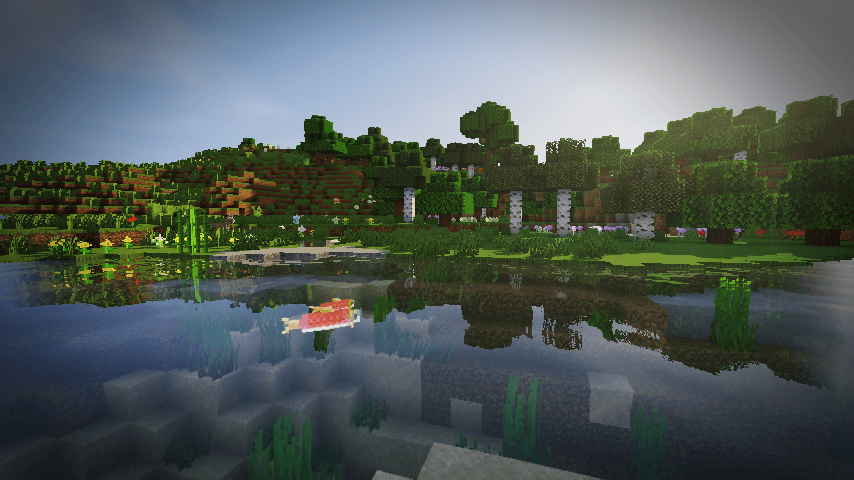
LIGHT Shaders
As light as light, as beautiful as painting.
Make you have both high FPS and good image quality.
Gallery

Features
FPS in your hands.
Optimized based on Chocapic13's Shaders,
Removed some unnecessary features,
Some bugs have also been fixed,
Let you have an excellent FPS.
Crisp and bright picture.
Removed some features of Chocapic13's Shaders,
But it's not one-size-fits-all like some shaders,
Instead, it retains excellent picture manifestation:
- Water reflections
- Water surface ripples
- Good shadows
- Outstanding performance in different weather
- Clouds that move with the wind
- TAA anti-aliasing (optional)
- and more...
And added a few features of it own.
Exclusive Atmosphere.
Gives you a unique atmosphere.
Excellent field of view brightness.
Doesn't make you feel so dark in the Nether instead of you can't see anything like the usual shaders.
Requirements
- Iris Shaders, Oculus Shaders or OptiFine.
- OpenGL 1.2 support.
- An ordinary GPU. (even extremely below average)
If you want to support my work, you can subscribe my Patreon membership.
The Ultimate Guide to Author87668's LIGHT Shaders
If you are exploring the vast world of Minecraft modifications, Author87668's LIGHT Shaders by Author87668 is a standout shader that deserves your attention. With over 102,824 downloads, it has become a staple for players looking to enhance their experience. As the creator describes it, this project is "As light as light, as beautiful as painting. Make you have both high FPS and good image quality.". Whether you are a veteran builder constructing massive cities, or simply a casual player looking to upgrade your survival world, this guide will provide you with all the essential details on how Author87668's LIGHT Shaders alters the game.
What Makes It Special?
Unlike standard shaders that simply alter superficial elements, Author87668's LIGHT Shaders digs deep into the game's engine to provide a cohesive, performance-focused experience. Author87668 has clearly spent significant time refining the project to ensure that every aspect feels polished and responsive for version 1.21.11.
Installation Guide
Getting Author87668's LIGHT Shaders up and running is straightforward. Follow these step-by-step instructions:
- Verify Your Version: Ensure your Minecraft launcher is set to version 1.21.11.
- Install Mod Loader (if required): If this is a mod, download the compatible loader (Forge, Fabric, NeoForge).
- Download the File: Click the secure download button above to retrieve the official file from CurseForge.
- Move the File: Place the downloaded file into your `mods`, `shaderpacks`, or `resourcepacks` folder depending on the shader type.
- Launch and Enjoy: Open Minecraft, navigate to the respective settings menu, and activate Author87668's LIGHT Shaders.
Compatibility & Performance
Compatibility is robust. Author87668's LIGHT Shaders is designed specifically for version 1.21.11, taking full advantage of the latest engine optimizations. Since this is heavily focused on optimization, you can expect significant frame rate improvements on both low-end and high-end hardware.


