

Why Wispy Shader is a top-tier shader mod for Minecraft 1.21.11
One of, if not the best performance shader without compromising on customizability and visuals.
⚙️ Quick Resource Specs
| Mod Creator | l_aggy |
| Latest Version | 1.21.11 |
| Supported Game Versions | 1.21.11, 1.21.10, 1.21.9, 1.21.8, 1.21.7 |
| File Size | 303.03 KB |
| Last Updated | |
| Total Downloads | 85,358 downloads |
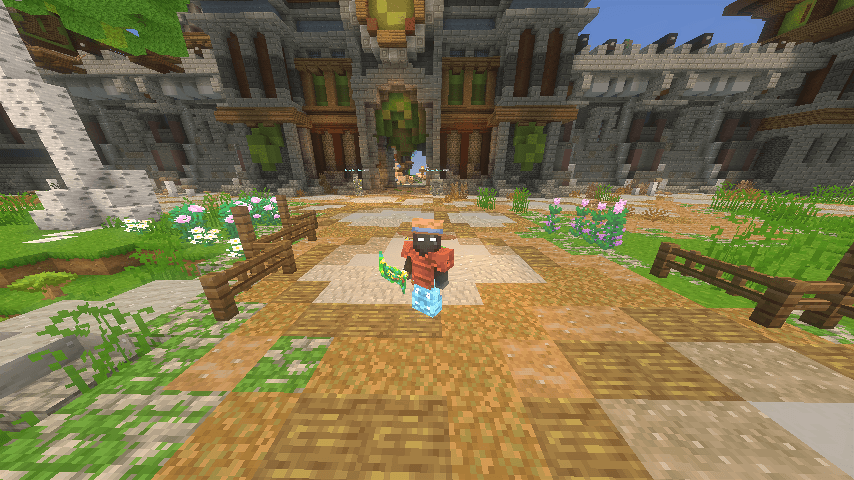
Wispy Shaders V1.4
A performance-optimized shader pack initially based on Mellow Shaders and outperforms many other so claimed 'potato' shaders. Works on all major versions. Also follow for updates.
Credits
- Original Shader: Mellow Shaders by TheCMK
- Performance Optimizations: l_aggy
Features
(All information and statistics is based on V1.3)
- Ultra-optimized for integrated graphics (iGPUs)
- 40%+ improvement on Balanced compared to MakeUp-Ultrafast with all effects off
- Color grading and biome‑specific lighting for all dimensions.
- Cinematic post‑processing: bloom, sharpening, tonemapping, TAA, motion blur, vignette.
To-do
- More benchmarking
- Adding features (Can't really optimize more)
- Bugfix some features
Performance Profiles
- iGPU (8 Chunks) tested on i5-4570 (HD4600) on CachyOS
- dGPU (24 Chunks) tested on R9 8940HX (5060 Laptop=4060 desktop) on Windows 11
- Choose a profile in shader settings that matches your hardware:
| Profile | FPS (iGPU) | FPS (dGPU) | Description |
|---|---|---|---|
| ULTRA_PERFORMANCE | 190+ | 440+ | Maximum FPS, minimal effects |
| PERFORMANCE | 190+ | ?? | Good balance for iGPU |
| BALANCED | 180+ | ?? | A mix of features |
| QUALITY | 120+ | ?? | More effects |
| ULTRA_QUALITY | 120+ | 350+ | Lowest FPS, All features |
Installation
- Install Iris Shaders or OptiFine
- Download Wispy Shaders
- Place the ZIP file in
.minecraft/shaderpacks/ - Select Wispy in Video Settings → Shaders
- Choose a performance profile
Optimizations
DisabledDeleted expensive composite passes by default- Fast gamma correction
- Simplified post-processing
- Optimized every composite pass and fog,lighting,sky,water,taa,bloom e.t.c
- Reduced shader complexity
- Too many to count now mainly faster math less calls,lookups and samples check source for more

Links
- Original Mellow: https://www.curseforge.com/minecraft/shaders/mellow
- Report Issues: https://github.com/epxlsol/wispy-shader/issues
Note: This is a performance-focused fork. For the original experience with all features, use Mellow Shaders.
The Ultimate Guide to Wispy Shader
If you are exploring the vast world of Minecraft modifications, Wispy Shader by l_aggy is a standout shader that deserves your attention. With over 85,358 downloads, it has become a staple for players looking to enhance their experience. As the creator describes it, this project is "One of, if not the best performance shader without compromising on customizability and visuals.". Whether you are a veteran builder constructing massive cities, or simply a casual player looking to upgrade your survival world, this guide will provide you with all the essential details on how Wispy Shader alters the game.
What Makes It Special?
Unlike standard shaders that simply alter superficial elements, Wispy Shader digs deep into the game's engine to provide a cohesive, performance-focused experience. l_aggy has clearly spent significant time refining the project to ensure that every aspect feels polished and responsive for version 1.21.11.
Installation Guide
Getting Wispy Shader up and running is straightforward. Follow these step-by-step instructions:
- Verify Your Version: Ensure your Minecraft launcher is set to version 1.21.11.
- Install Mod Loader (if required): If this is a mod, download the compatible loader (Forge, Fabric, NeoForge).
- Download the File: Click the secure download button above to retrieve the official file from CurseForge.
- Move the File: Place the downloaded file into your `mods`, `shaderpacks`, or `resourcepacks` folder depending on the shader type.
- Launch and Enjoy: Open Minecraft, navigate to the respective settings menu, and activate Wispy Shader.
Compatibility & Performance
Compatibility is robust. Wispy Shader is designed specifically for version 1.21.11, taking full advantage of the latest engine optimizations. Since this is heavily focused on optimization, you can expect significant frame rate improvements on both low-end and high-end hardware.


