

Why Muuf A.G.I Shaders is a top-tier shader mod for Minecraft 1.21.11
New minecraft shaders (work in project)
⚙️ Quick Resource Specs
| Mod Creator | LhMaanMC |
| Latest Version | 1.21.11 |
| Supported Game Versions | 1.21.11, 1.21.10, 1.21.9, 1.21.8, 1.21.7 |
| File Size | 743.43 KB |
| Last Updated | |
| Total Downloads | 266,167 downloads |
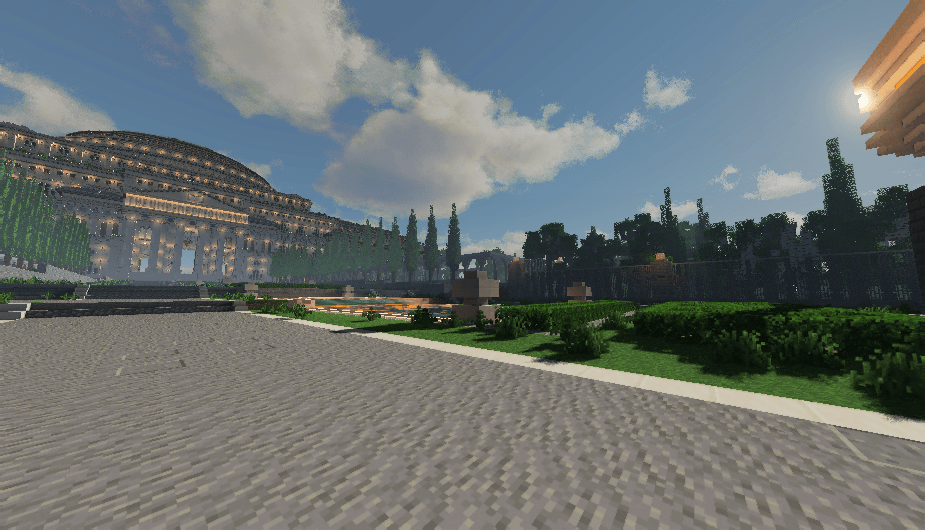
Muuf A.G.I ReBuild
ABOUT
Muuf A.G.I Shaders is a semi-realistic shaderpack for Minecraft that strikes a balance between visual fidelity and wide compatibility. Whether you're on a high-end gaming rig or running Minecraft through PojavLauncher on your phone, Muuf A.G.I delivers a beautiful experience without sacrificing performance.
this shader is based on MakeUp ultra fast
Crafted with attention to lighting, materials, and atmosphere, this shader brings Minecraft to life with:
-Volumetric clouds that respond naturally to lighting and time of day
-PBR (Physically Based Rendering) for realistic materials
-Parallax Occlusion Mapping (POM) for added depth and surface detail
-Real-time reflections using screen-space techniques
Compatibility with both OptiFine and Iris shaders mod
Works on all GPUs, from desktop cards to mobile chipsets
Muuf A.G.I is designed to be flexible—beautiful enough for cinematic screenshots, but optimized enough for survival gameplay. Whether you're building in creative or exploring vast survival worlds, this shader adds a subtle but powerful upgrade to your visuals.
By downloading or using Muuf A.G.I Shaders, you agree to the following terms:
1. No Redistribution
You are not allowed to reupload this shaderpack on any website or platform (e.g., CurseForge, Modrinth, MediaFire, Google Drive, YouTube links) without explicit permission from the original creator.
2. No Modification or Renaming Without Permission
You may not modify, edit, or rename this shaderpack for public use or upload without permission. That includes edits, remixes, or renamed versions.
3. Personal Use Allowed
You are free to modify this shaderpack for personal use only. Public sharing of modified versions is not allowed.
4. No commercial use
You may not sell, monetize, or include this shaderpack in any paywalled content or modpacks.
You allowed to
take a screenshot or recording
For permission requests, contact the original creator via Discord.
Join the community and stay updated:
The Ultimate Guide to Muuf A.G.I Shaders
If you are exploring the vast world of Minecraft modifications, Muuf A.G.I Shaders by LhMaanMC is a standout shader that deserves your attention. With over 266,167 downloads, it has become a staple for players looking to enhance their experience. As the creator describes it, this project is "New minecraft shaders (work in project)". Whether you are a veteran builder constructing massive cities, or simply a casual player looking to upgrade your survival world, this guide will provide you with all the essential details on how Muuf A.G.I Shaders alters the game.
What Makes It Special?
Unlike standard shaders that simply alter superficial elements, Muuf A.G.I Shaders introduces a wide array of visual and mechanical features designed to seamlessly blend into the vanilla aesthetic. LhMaanMC has clearly spent significant time refining the project to ensure that every aspect feels polished and responsive for version 1.21.11.
Installation Guide
Getting Muuf A.G.I Shaders up and running is straightforward. Follow these step-by-step instructions:
- Verify Your Version: Ensure your Minecraft launcher is set to version 1.21.11.
- Install Mod Loader (if required): If this is a mod, download the compatible loader (Forge, Fabric, NeoForge).
- Download the File: Click the secure download button above to retrieve the official file from CurseForge.
- Move the File: Place the downloaded file into your `mods`, `shaderpacks`, or `resourcepacks` folder depending on the shader type.
- Launch and Enjoy: Open Minecraft, navigate to the respective settings menu, and activate Muuf A.G.I Shaders.
Compatibility & Performance
Compatibility is robust. Muuf A.G.I Shaders is designed specifically for version 1.21.11, taking full advantage of the latest engine optimizations. During typical gameplay, this addition maintains a stable frame rate, though lower-end laptops might experience slight stuttering. We recommend pairing this with performance boosters like Sodium or Iris to guarantee a silky-smooth experience.


